Timer
One click and the clock runs.
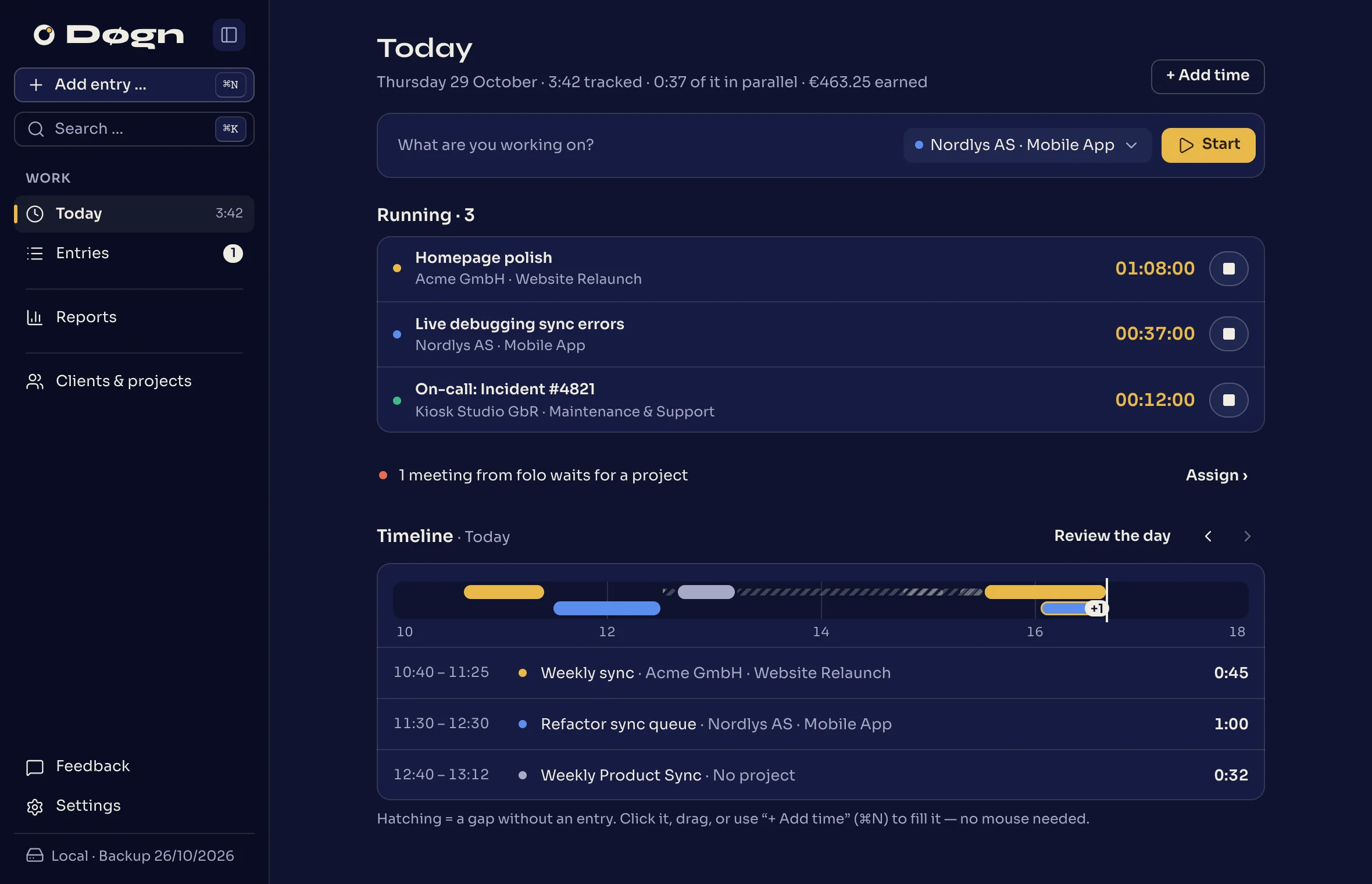
You click the timer in your menu bar, pick the project and get back to work. Two things at once? Then each gets its own lane. You see the client by the colour.
We built Døgn for the days when you switch projects, forget a timer, and still have to send an invoice. Fill in the gaps when you need to. Your time entries stay on your computer by default. €49 once.
Free for 14 days · Mac · Windows · Linux · No account
Timer
You click the timer in your menu bar, pick the project and get back to work. Two things at once? Then each gets its own lane. You see the client by the colour.
From folo
folo took notes on your call, so the time is already here. Grey just means you haven’t said which client it belongs to.
Fill in
You were working, but no timer ran. Døgn noticed and marks the spot. One click and it counts. That’s activity capture, which is on from setup.
Gap
You step away and the clock stops. That time stays empty, and you only bill what you actually worked. This is on from setup too. You can turn both off.
So far
Every minute sits with the right client, at their rate. You don’t add anything up. If you use tjent, one click turns it into the invoice.
3:42 tracked · 0:37 of it in parallel · €463.25 earned
Write down what you’re working on and pick the client. If you forget to start the timer, Døgn shows the gap and lets you fill it in. That’s one less thing to work out on Friday.

For developers
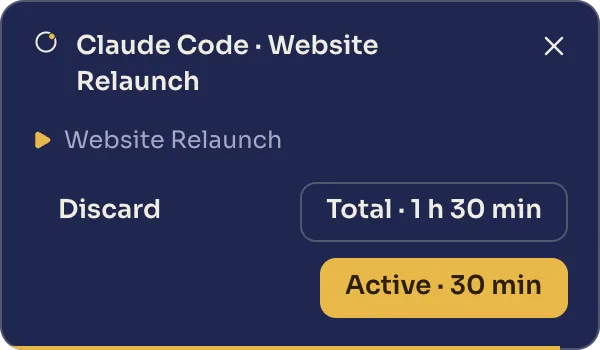
Switch it on once in Settings and tell Døgn which folder belongs to which client. After that it counts every session with Claude Code, Codex or Antigravity. At the end it asks you: the whole session, or only the time you were there? By default your prompts stay on your computer. Claude or Codex only come in when you switch them on yourself, and then they write the entry’s description.


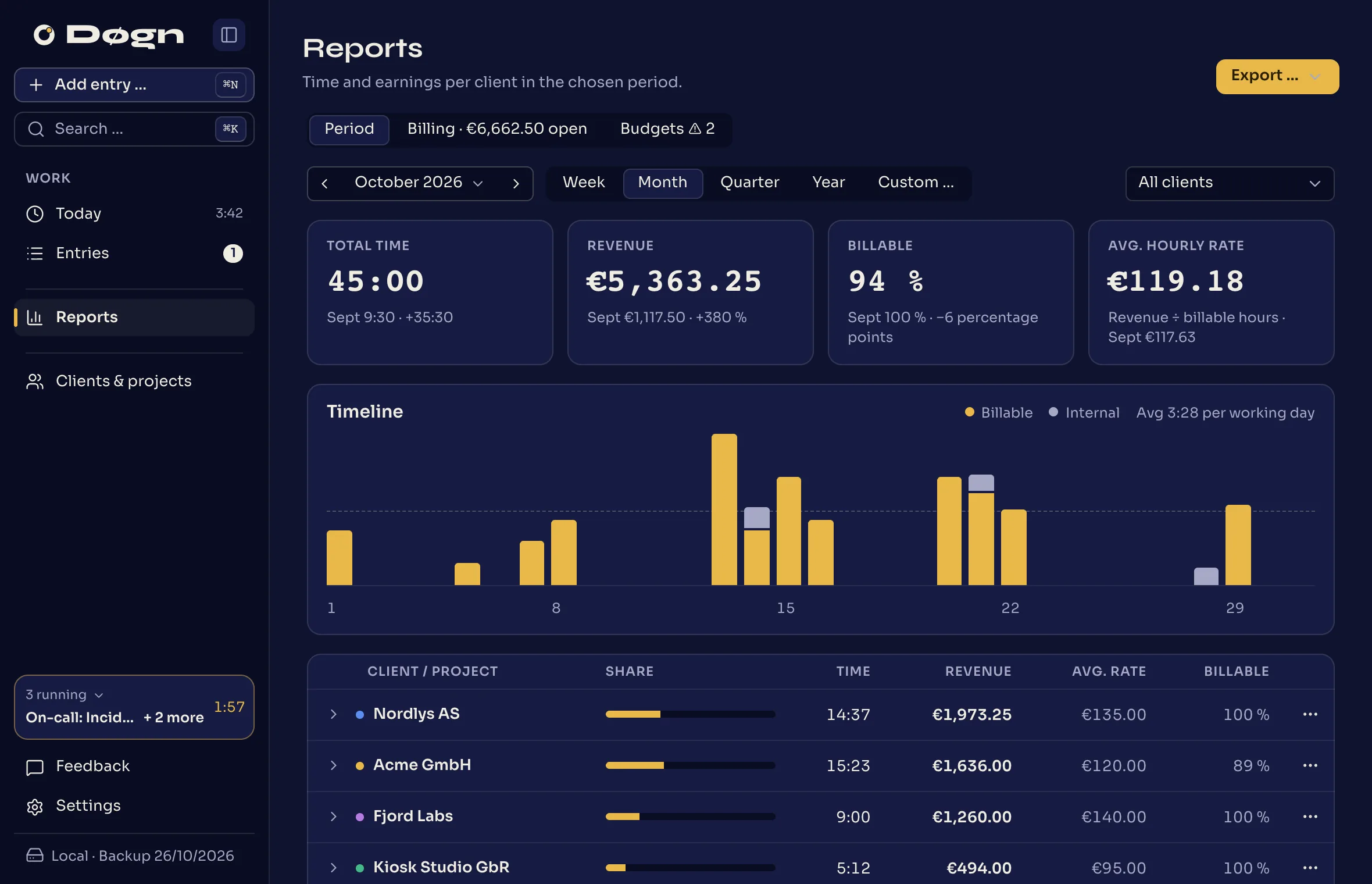
How many hours, for whom, and what haven’t you billed yet? You get the answer in hours and euros, not in a dashboard you have to decode.
€6,662.50 not billed yet · Bill in tjent
Run several timers side by side. Each keeps its own line, and none overwrites another.
You’re away for a while and Døgn stops. If you like, it also reminds you when a timer runs suspiciously long.
If you use folo, every finished call lands here as time. You only pick the client.
Give each client a rate and a budget. You see it running short while you can still do something about it.
One click gets you a PDF for your client or a spreadsheet for your accountant, for any period.
Finished clients go to the archive. Their hours and amounts stay.
| Feature | Døgn | Typical subscription |
|---|---|---|
| Your data lives | on your computer | on their servers |
| Account needed | no | yes |
| Claude Code & co. | counted automatically once you switch it on | usually a manual timer |
| From hours to invoice | one click to tjent | retyping or an add-on |
| Without internet | tracks offline; the licence goes online briefly every 14 days | usually online only |
Døgn is a time tracking desktop app for freelancers and developers who bill by the hour. It runs on macOS, Windows and Linux, keeps your hours in a local database on your computer and costs a one-time price. It is made for one person, not for teams.
| Døgn | |
|---|---|
| What | Time tracking desktop app for freelancers, self-employed people and developers who bill hours per client and project |
| Systems | macOS 14 or later (Apple silicon and Intel), Windows 10 and 11 (64-bit), Linux (AppImage, x86_64). The same desktop app on all three systems |
| Data | Stored locally in a database on your computer, with automatic backups (weekly by default). No account, no cloud sync, no telemetry |
| Price | €49 once, updates included. No subscription, no account. Free for 14 days. |
| Tracking | One-click timers, several in parallel, filling gaps later, activity capture and an idle check (ticked during setup, can be turned off), AI sessions with Claude Code, Codex and Antigravity (off until you switch it on) |
| Reports | Rates, budgets, reports, CSV export and timesheets as PDF |
| Works with | Open hours become an invoice draft in tjent, meetings from folo, a local MCP server, webhooks |
| Without internet | The licence is confirmed online every 14 days. If that fails, Døgn keeps working for another 14 days; after that your data stays readable and exportable, but it tracks new time only after the next check. |
| Not included | Teams and multiple users, phone app, web version, sync between devices, invoices of its own (that is what tjent does) |
Topics (German): Zeiterfassung für den Mac · Zeiterfassung für Windows · Zeiterfassung für Linux · Zeiterfassung ohne Abo · Lokale Zeiterfassung ohne Cloud · Zeiterfassung für Claude Code und Codex
One click in your menu bar or taskbar is enough, Døgn takes your last project. Your Claude Code, Codex and Antigravity sessions don’t even need that once you switch them on.
Yes. You can change every entry afterwards and fill gaps with one click.
No. Døgn works on its own, and you can export your hours as a PDF or spreadsheet. With tjent you save yourself the typing.
On the Mac from macOS 14 (Apple silicon or Intel), on Windows 10 and 11 (64-bit) and on Linux (x86_64, as an AppImage). The Mac build is signed and notarized by Apple. The Windows installer isn’t code-signed yet, so SmartScreen may ask you once.
Døgn stays on your computer and your entries stay readable, but it stops tracking until you enter a licence key. A licence costs €49 once. Until 1 December 2026 Døgn is in early access and needs no licence at all; your 14 days start then.
Your times stay on your computer. Update and licence checks send a little technical data, never your entries. If you set up webhooks or connect an MCP client, it gets what you allowed. Claude and Codex only see your session prompts if you switch on their tracking yourself. If you type a sentence into the palette (Ctrl/⌘ K) and pick “Understand as a request”, that sentence goes to the Claude Code or Codex command line on your computer and from there to Anthropic or OpenAI. Only when you use it.
Yes, tracking needs no connection. Once licensed, Døgn confirms the licence online every 14 days. If that fails, it keeps working for another 14 days; after that your entries stay readable and exportable, and tracking resumes after the next successful check.
You pay through Paddle, our merchant of record. Paddle handles EU VAT and sends you a proper invoice.
Paddle handles refunds under its buyer terms. If something isn’t right, just write to us.
€49.
You pay once, not every year.
Free for 14 days, then €49 once. All systems and requirements
For Mac, Windows and Linux, updates included. You don’t need an account, and your times stay on your computer. Secure checkout via Paddle.
Early access: until 1 December 2026 Døgn needs no licence; your 14 days start then.