It tracks your AI coding sessions
Work with Claude Code, Codex or Antigravity? Døgn tracks those sessions automatically and writes a short, on-device summary as the entry description — no timer, no cloud.
Døgn sits in your Mac’s menu bar and tracks your Claude Code, Codex and Antigravity sessions automatically — writes an on-device summary and publishes the billable time through the local suite graph for tjent. Local-first, one-time, no subscription.
Less than four months of a time-tracking subscription — and it’s yours forever. All kveik software is in early access.
Website redesign
Design system & components
02:10:47
Not a usage monitor, not a dev-metrics dashboard, not a streak card — the local-first Mac tracker that turns your AI coding sessions into billable hours for the living draft in tjent.
You run five terminals across three projects, agents working in parallel. Døgn tracks each session on its own line and writes a short, on-device summary — no timer to start, nothing typed twice at month’s end.
Most time trackers want a login, a subscription, and your primary data on their servers. Døgn stores it on your Mac by default, starts with one click, and hands you a clean, billable day.
Four steps, one menu bar — Døgn tracks locally, tjent owns the living draft.
Hit the menu-bar icon or ⌃⌘T. The Døgn starts on your last project instantly.
The timer ticks live and earnings add up by your per-project rate — seconds glow gold.
Døgn publishes finished time entries through the local KveikGraph — separate from configured HTTPS webhooks.
tjent owns the invoice-draft workflow and keeps it linked to Døgn’s published time entries.
From the first click to the finished invoice — calm, local, and built for the way freelance work actually flows.
Work with Claude Code, Codex or Antigravity? Døgn tracks those sessions automatically and writes a short, on-device summary as the entry description — no timer, no cloud.
Track more than one project in parallel — each on its own line, never overwriting the other.
A 24-hour timeline shows tracked work, gaps, and active-but-untracked stretches — scroll back through earlier days at a glance.
Finished meetings from folo arrive as tracked, billable time, ready to assign to the right client and project.
Click the menu-bar icon or press ⌃⌘T. ‘Continue with [Project]’ resumes your last project instantly. The running status and the seconds segment glow gold so you always know it’s live.
Organize work by client and project with per-project hourly rates. Watch earnings add up live. Archive finished clients without losing their history.
Døgn publishes time entries through the local KveikGraph; tjent owns the linked invoice draft. Configured HTTPS webhooks remain a separate generic integration.
„Track in Døgn — draft in tjent."
Edit entries after the fact, get a reminder when a timer runs long, and let idle detection stop a forgotten timer — so a day is never over-billed by accident.
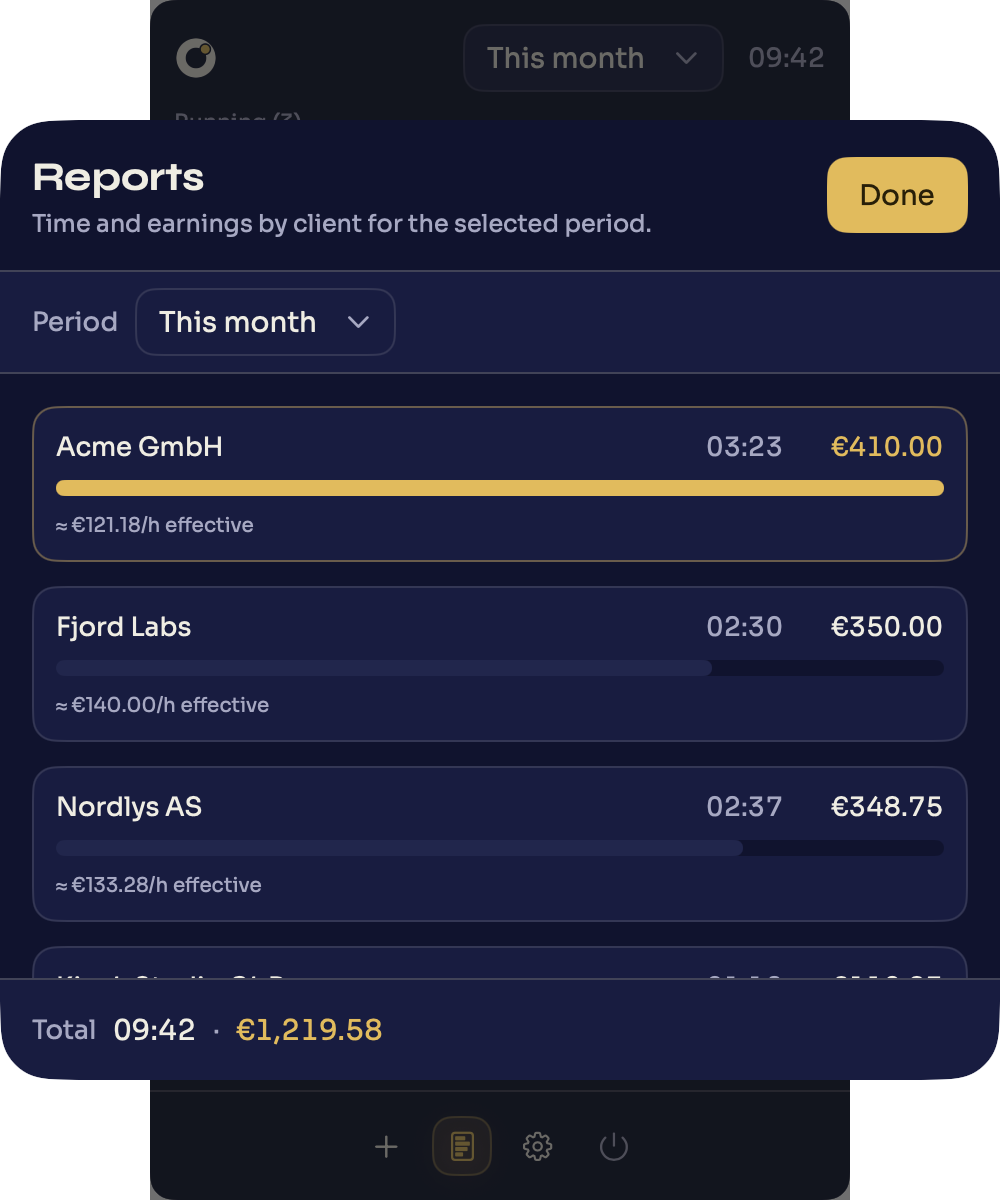
Time and earnings by client for any period, from this week to all time. One-click CSV export for accounting and archiving.
Tracking data lives in Core Data on your Mac by default. Configured HTTPS webhooks send selected payloads; the local MCP server exposes suite data to the connected client, whose own network behavior is outside Døgn. Update and license traffic is operational and contains no time entries.
Time and earnings by client for any period — then one-click CSV export. This is the actual app.
Buy it once — keep it, and your data, forever.
| Døgn | Subscription trackers | |
|---|---|---|
| Pricing | €49 once | €90–140 per year |
| Your data lives | On your Mac | On their servers |
| Account / login | None | Required |
| Tracked time → invoice | Local graph → tjent draft | Manual or paid add-on |
| Works offline | Always | Needs the cloud |
Less than four months of a time-tracking subscription — and it’s yours forever.
macOS 15.5+ · Universal · Signed & notarized · Secure checkout via Paddle
Download
The current build is signed and notarized. Updates install themselves from then on.
Download for Macv0.5.1 · 16.6 MB · macOS 15.5+ · Apple silicon & Intel
All kveik software is in early access.
No — €49 once. One-time purchase with free updates.
Local by default: Core Data on your Mac, no Døgn cloud account and no telemetry. Configured integrations remain under your control.
Tracking data stays in local Core Data by default. Update and license checks are operational and contain no time entries. Configured HTTPS webhooks send selected payloads; connected MCP clients can read local suite data, and their own network behavior applies.
Yes, optionally — Døgn detects AI coding sessions (Claude Code, Codex, Antigravity) and writes a short, on-device summary as the entry description. No cloud involved.
Døgn has no cloud sync or cloud data store. Tracking data stays local by default; configured HTTPS webhooks and connected MCP clients are explicit integration boundaries.
Your Døgn data is part of your normal Mac backup (Time Machine / migration assistant). You can also export everything to CSV at any time.
Not by design — it stays local. Use CSV export to move data.
No. Configured HTTPS webhooks are a separate generic integration. Døgn publishes time through the local KveikGraph, and tjent owns the living invoice draft.
Checkout runs through Paddle as merchant of record — they handle EU VAT and send you a proper invoice.
Automatic and in-app — signed and notarized.
Refunds are handled by Paddle under their buyer terms — reach out if something’s not right.
From the first click to the invoice — and never off your Mac.